I've been building and using Grid Console for a little over 9 months now. It wasn't really supposed to become a product. I built it for myself and just kept adding things that were useful for my own work.
You can try the interactive demo here before reading on. Take control and click around the board, open a card or have a look at the code view. It uses sample projects and tasks.
Most of those things came from running several coding agents at the same time. I'd have a bunch of tmux sessions open, switch back to one and think: what was this agent doing again? Then I'd scroll upwards. Somewhere in that conversation was the task, the plan, a question I'd answered, something unexpected it found, and an explanation of what it changed. I needed to put all of that back together before I could decide what to do next. Meanwhile, I had other sessions to check.
That's roughly how Grid started. It's a local application around coding agents such as Claude Code, Codex and Copilot. They run through their own CLIs, on your own provider accounts. Grid keeps track of their work as cards and gives me somewhere to plan it, answer questions, review changes and get the work finished.
Yes, I use Grid to build Grid :)
Most screenshots below come from the interactive demo above, with sample projects and tasks. The two screenshots of the changed-file list and diff viewer in the review section are from my own work on Grid. Each caption identifies which you're looking at.
I was spending a lot of time checking on agents
I wanted to run multiple tasks against the same codebase, without agents modifying each other's working directory. I also wanted to work across projects without losing track of what I'd left running. But the part that kept bothering me was how often I had to go and check on everything. Was the agent still working? Had it finished? Was it asking me something? Had it stopped halfway through?
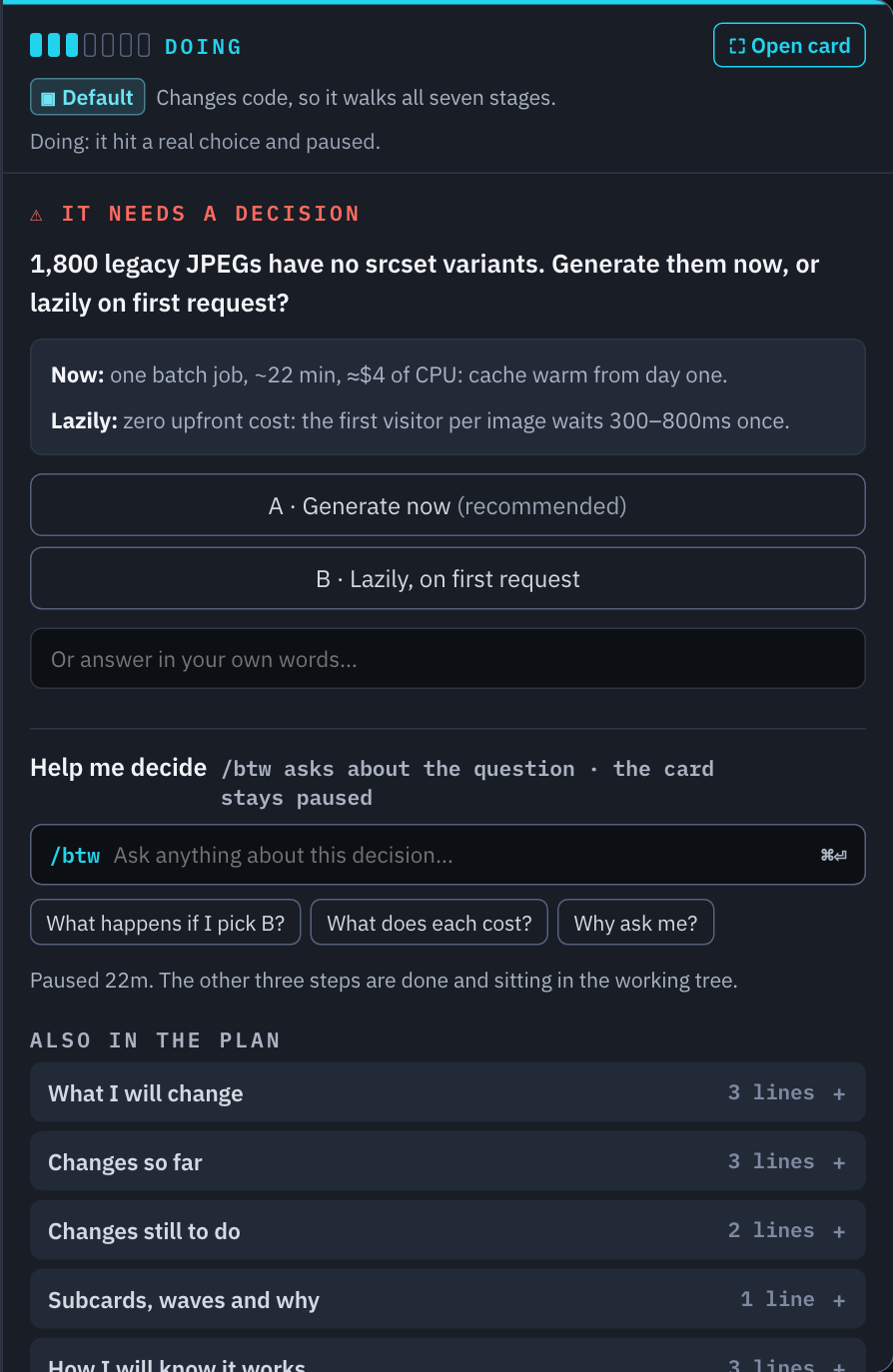
The board is where I usually start now. Cards sit in the stage they're in, and the ones that need me are highlighted. Opening one brings up the session and the information around the task. A question has somewhere to be answered, and a plan or review has somewhere to be approved or sent back.
That matters more to me than the number of agents I can start. If every additional agent needs another conversation watched all day, I quickly run out of attention.
I'm still responsible for the code
I'm using agents for real engineering work. The code I submit gets reviewed by my peers, and I need to be able to explain it. When someone asks why something was implemented a certain way, "Claude did it" obviously isn't a useful answer.
Before I approve a change, I want to understand what was built, what assumptions went into it, and whether anything changed from the plan I agreed to. Sometimes the agent has a good reason for taking a different approach. Sometimes it misunderstood something. I need enough context to tell the difference. I also want to be able to challenge it. Why did it add a dependency? What happens if that request fails? Did it actually run the changed feature, or only the tests that were already there?
I don't want to sit there watching every command. I do want to understand the work well enough to take responsibility for it.
The card holds what we need to remember
A card is basically a Markdown file. It holds the task, the plan, decisions, progress and the information the next agent or I will need. The conversation is still there. I open it when I want to see what the agent actually did or ask it something. But I can come back to the card and get the important context without reading the whole conversation again.
This also lets a fresh agent pick up the work. Once planning is done, the implementation session can start with the card as its brief. It has the scope and the decisions we've already made, even though it wasn't part of that earlier conversation. I've found this useful as tasks get longer. I don't have to keep one conversation going through planning, implementation, review and delivery. I do have to make sure the things that matter get written down.
How a task usually goes through Grid
I ended up putting an SDLC around the agents: Prepare, Doing, Review, Deliver, Verify and Close. Each stage came from something I kept having to deal with myself.
During Prepare, an agent investigates the request and the codebase. It works out what needs to change, which repositories are involved, how to run and test the project, and what will tell us the task is finished. If an answer would change what we're going to build, I'd rather settle it here.
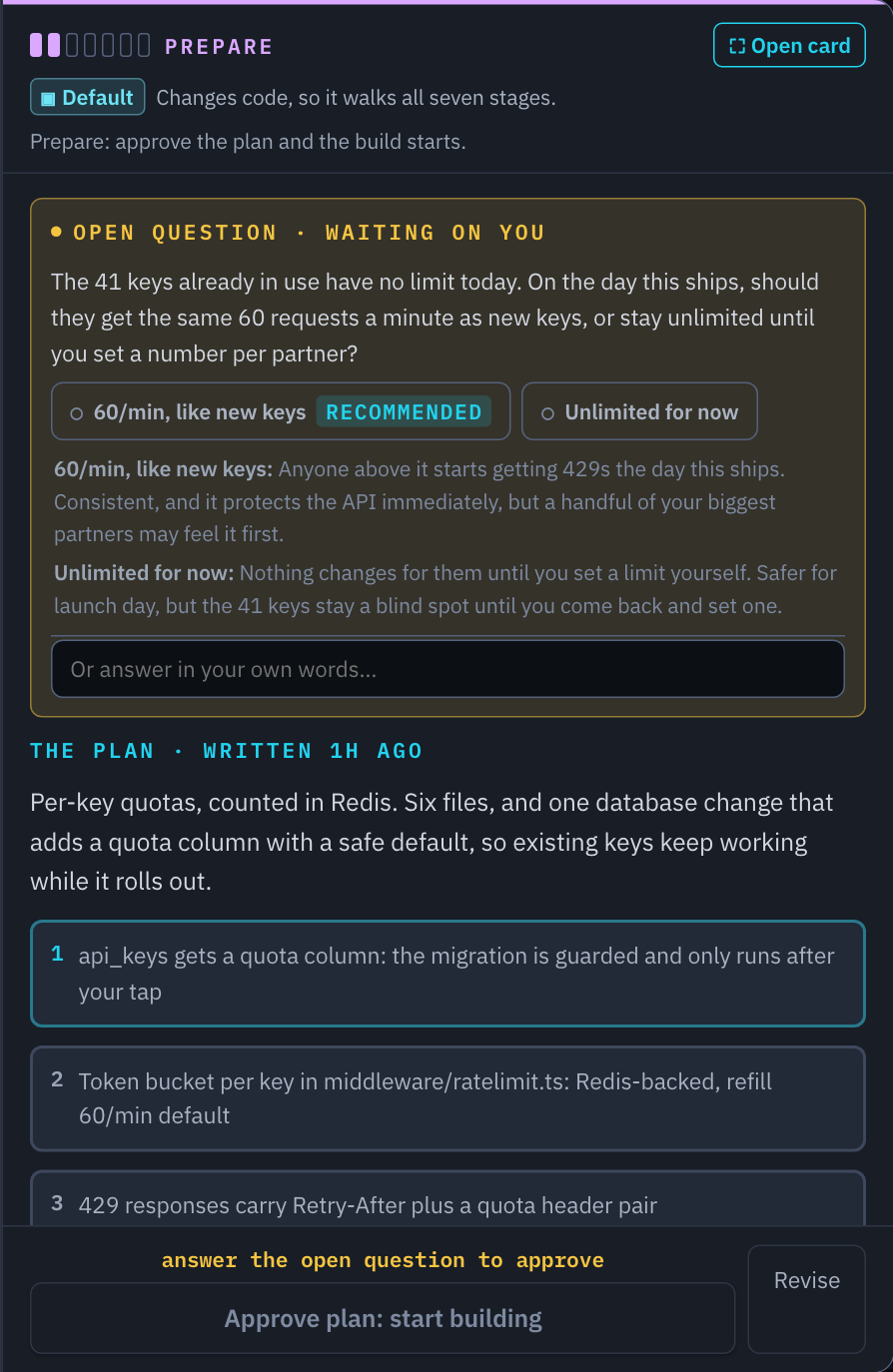
Once I approve the plan, a fresh agent can start implementing it. Code changes normally happen in a separate Git worktree, so I can have several tasks underway without their unfinished files appearing in the same working directory. Worktrees don't make integration problems disappear. Two changes can still conflict when they come together. They do give each task somewhere to be built and reviewed on its own.
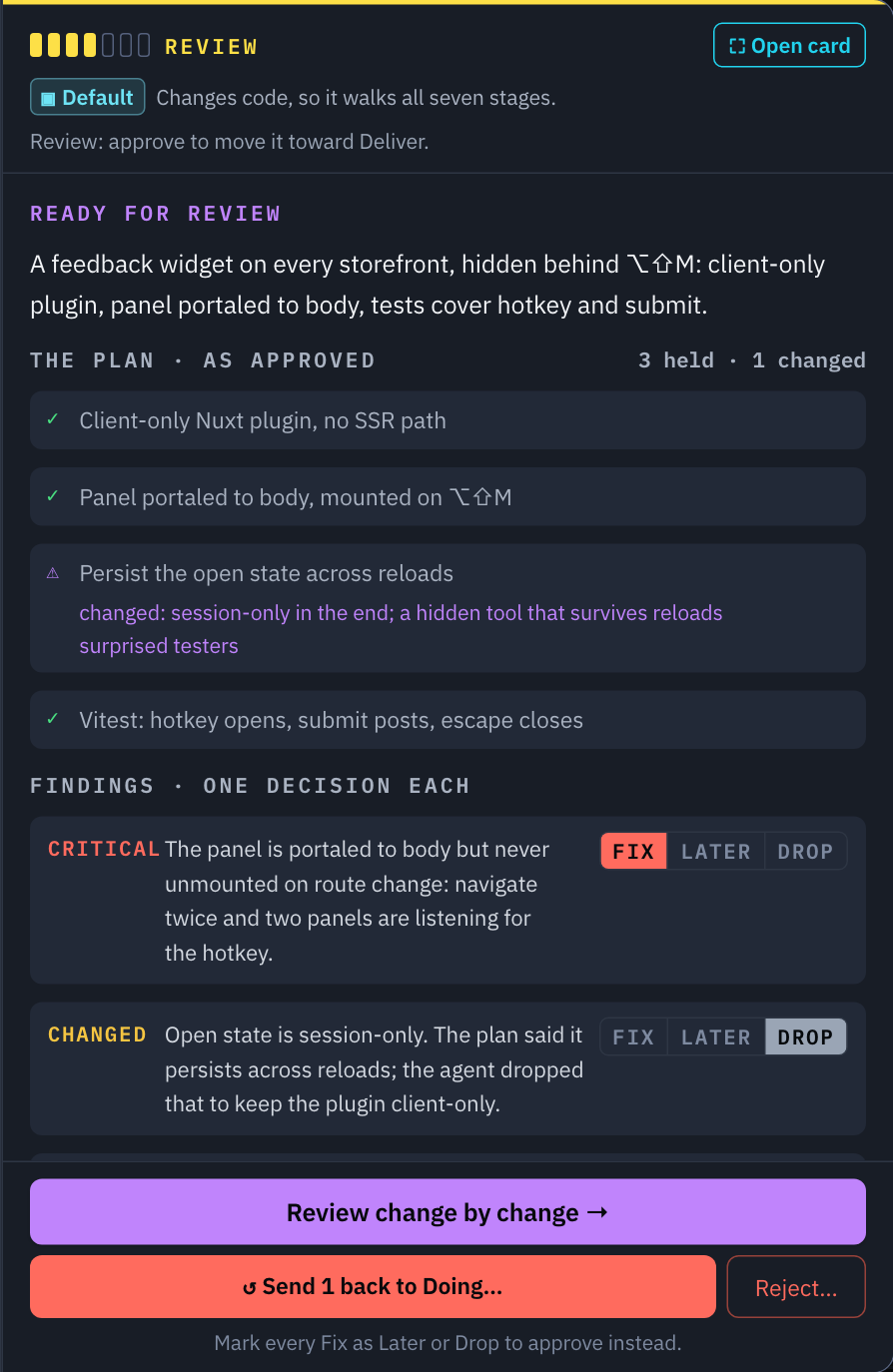
When the work reaches Review, I can see the approved plan alongside what happened. The panel brings together the changed files, assumptions and things that need my attention. I can open the diff, inspect a particular change and ask for revisions.
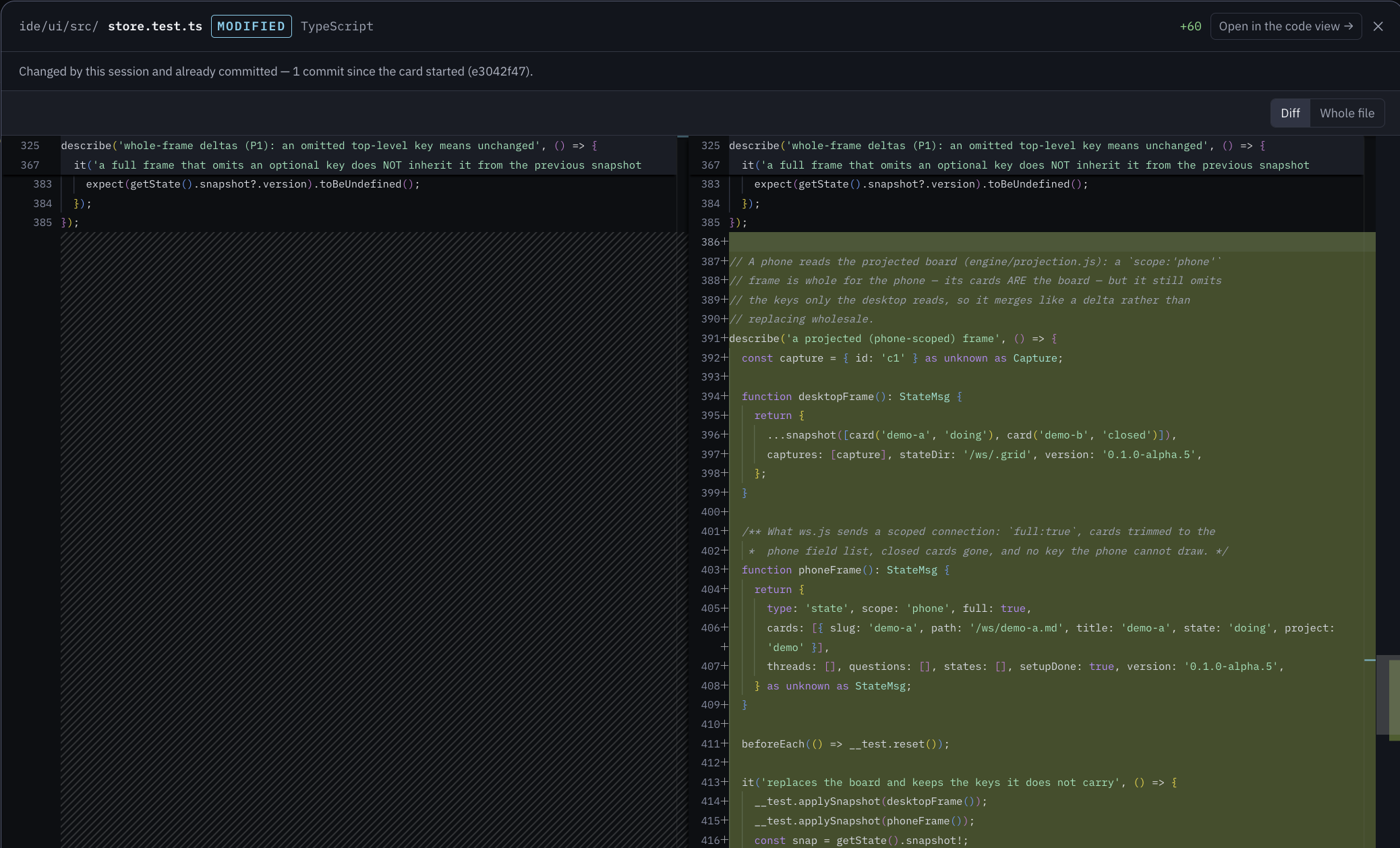
The changed files are grouped under the work they belong to. That helps me remember why I'm looking at them in the first place. I want to understand why a change was needed and then check whether the code actually does what the explanation says. Having that context next to the review saves me another trip through the conversation.
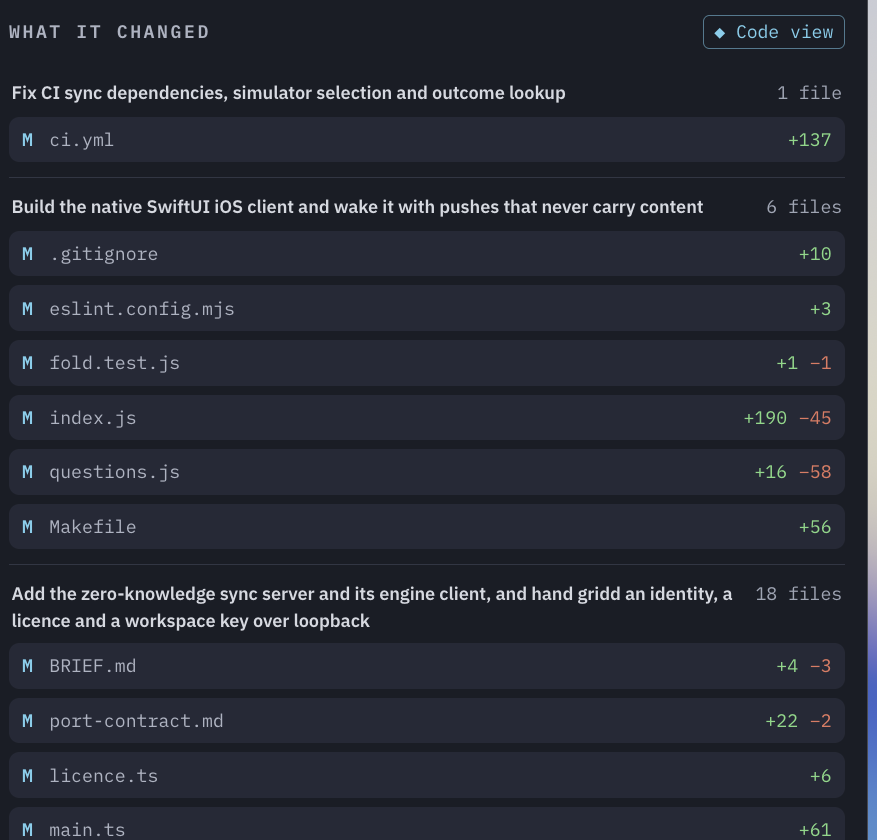
Opening a file brings up the side-by-side diff. I can switch to the whole file or open it in the code view if I need more context. The viewer also tells me when the changes have already been committed by the session, so committing the work doesn't make it disappear from review.
For harder tasks, Grid can hand the work to a fresh reviewer first. That agent reads the diff and writes up its findings. I still need to judge those findings, especially when fixing one would change the scope of the task. The explanations help me find my way through the work. I also want to inspect the code and the test results. An agent being confident about its implementation doesn't settle it for me.
Getting the change finished
There is usually still work to do after the implementation is approved. The branch needs to land, checks need to run, and sometimes a service needs restarting before anyone can see the change. Deliver tracks that part of the job. Depending on the project, delivery can mean a local merge, a push, or opening a pull request or merge request. The project settings decide how that happens and where approval is needed.
Verify is where the changed behavior gets exercised. I want to know what was actually tried and what happened. If a check can't run on that machine, I want to see that too. The order is configurable. Some projects need verification before delivery, and some have no separate Deliver stage. I want the workflow to fit how that project ships.
Once useful things have been discovered, they can be written into project memory: how to start a service, which test command works, a convention, or some strange codebase detail the next agent will otherwise spend time rediscovering. These are notes kept on disk and reused in later work. I can read and correct them.
Sometimes the task is too big for one card
For larger jobs I use Masterplans. A masterplan breaks the work into subcards and records which ones depend on others. Some pieces can run at the same time. Others have to wait, or touch the same files and need to be done in order. The masterplan coordinates that work, then brings the pieces together for a review of the whole job. I want to review how the pieces fit together, even when they've each passed their own tests.
There are also Research cards for investigating something without implementing it, Recurring cards for scheduled work, and Guards that react to events. I use Ask Grid when I'm still figuring out the problem. We can discuss and investigate it there, then create cards once there's actual work to do.
Finding my way around the code
I spend most of my time on the Board, but there are two other views I use regularly. Agents shows the sessions and what each one is working on. It's useful when I want to check a particular agent or get back into its conversation.
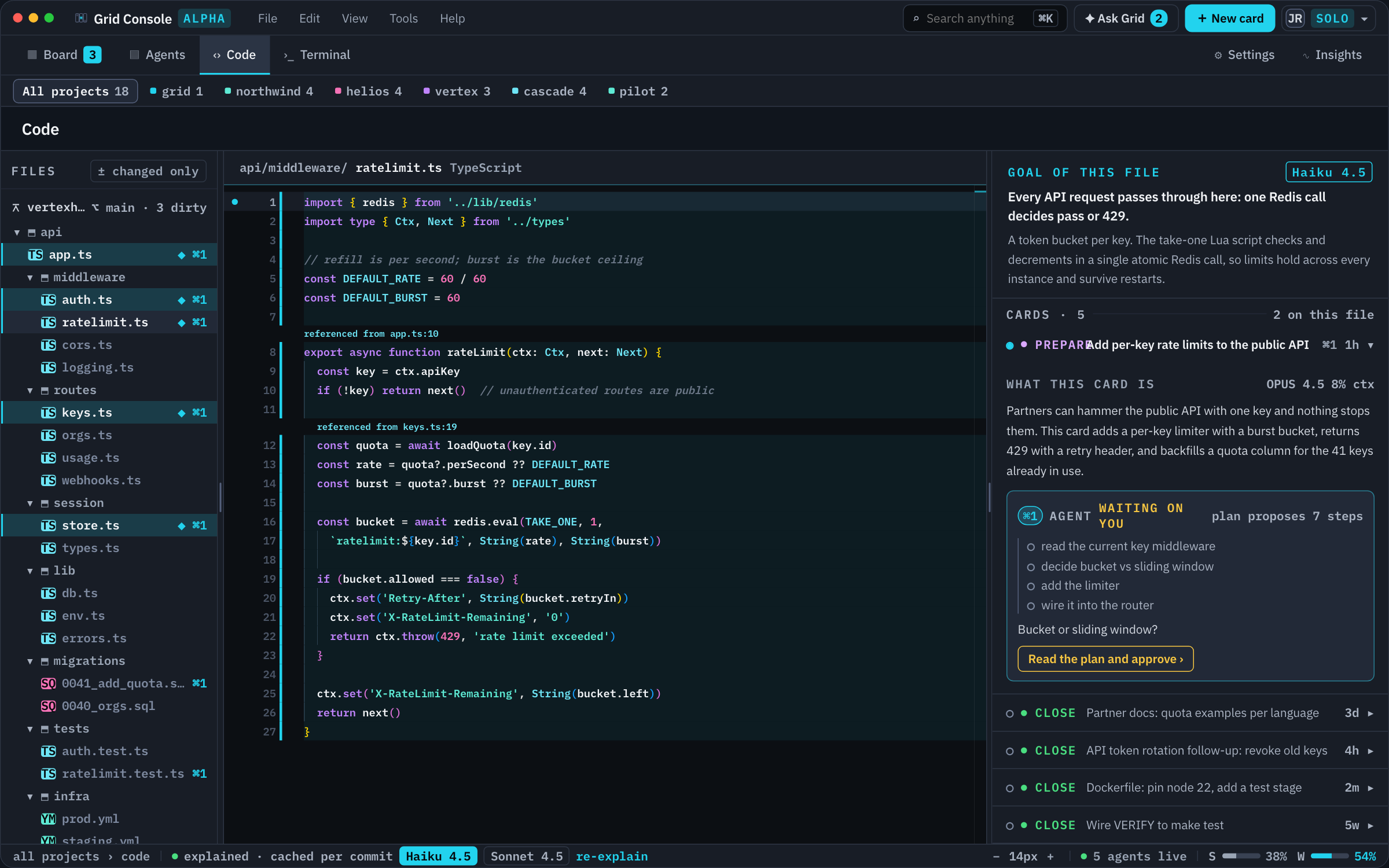
Code opens the files in the context of the work. If I open it from a card being built in a worktree, it opens that worktree's code. I can see the cards associated with a file and explanations of the changes around it. With several tasks underway, I want to be sure I'm looking at the right version of a file. Having the card, its changes and the code connected helps with that.
A small change should stay small
Earlier on, even a tiny task could end up going through enough process that it would have been quicker to open a Claude shell and ask for the change there. So a card has a difficulty, which affects the amount of process and compute used for it. Easy work can take a shorter path. Harder work can get more reasoning during planning and an independent reviewer.
There's a separate workspace setting for compute budget: Economy, Balanced, Quality or Maximum. I can change that without going through every workflow rule and changing models by hand.
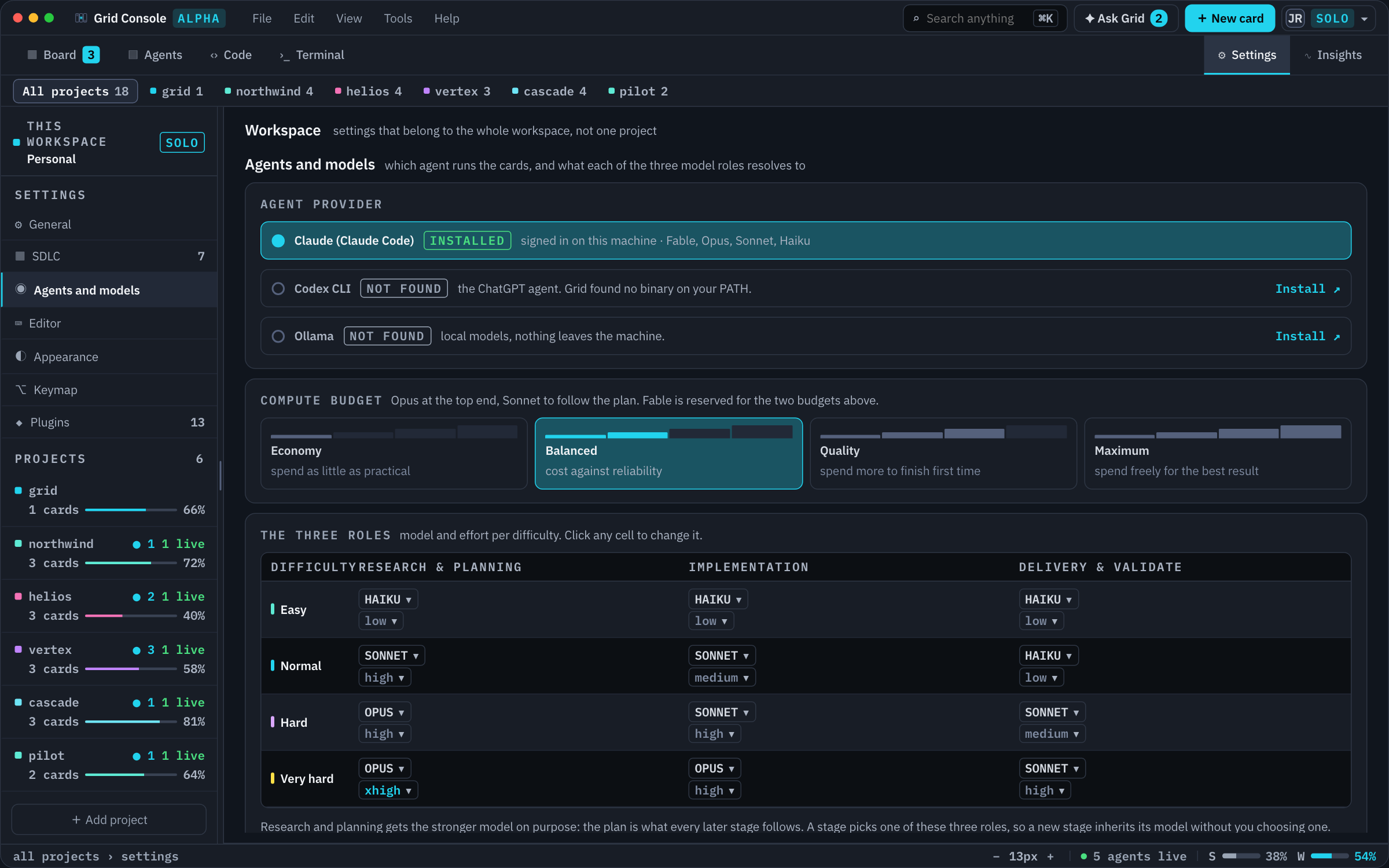
The task might be just as hard today as it was yesterday, while the amount of compute I'm willing to spend on it has changed. Sometimes I'm close to a provider's usage limit. Sometimes I want to give a difficult plan more room. These settings choose models and effort levels. They don't enforce a hard spending cap, and support varies by provider. Model access is paid for through your own provider account.
Accounts matter too
I use different coding agents, and sometimes a particular project needs to use a particular account. That can be the account I'm required to use for that work, or simply the one I want the task billed to. Grid can keep multiple provider accounts in a workspace. A card can be assigned an account, and a project can use a pool of accounts for new sessions. The card keeps a record of account changes, so I can see which accounts have worked on it.
Claude Code, Codex and Copilot are available as agents. Some parts work better with one provider than another, particularly questions, approvals and usage information. I'm still working through those differences.
I also use it from my phone
I use Tailscale to reach my machine and have Grid's web interface installed as a PWA on my phone. Mostly I use it to see what's happening, answer a question, approve a plan or start another piece of work. If an agent needs a decision twenty minutes after I leave my desk, I can deal with it there. That's my current setup, connected back to the machine running Grid.
I'm working hard on a native mobile app to replace that PWA setup. Collaboration on the same board, broader plugin support and hosted options are next too. There's still work to do before those are ready for people to use, but that's where I'm taking Grid.
There are plenty of my opinions in here
Grid is filled with small things I've added along the way. Prompt engineering, getting agents to break work into task lists and keep them updated, different agents taking each phase, multiple projects in one workspace, separate worktrees, and a code viewer that understands which cards and worktrees the code belongs to. Some of these took a lot of work. Others are tiny things I got tired of doing manually. Together they've made working with AI much more manageable for me.
That's also why I find it hard to put Grid in one product category or describe it as a replacement for something else. It grew into this combination of small and big things that helped me work better. Your way of working will be different, which is a big part of why I want it to be extendable through plugins. If Grid covers 80 or 90% of what you need, I'd like you to be able to build the remaining parts on top of it. I'm gradually moving more of the parts that can live outside core into plugins myself.
You can inspect and edit the prompts and requirements in Settings. The plugin documentation explains what can be extended today.
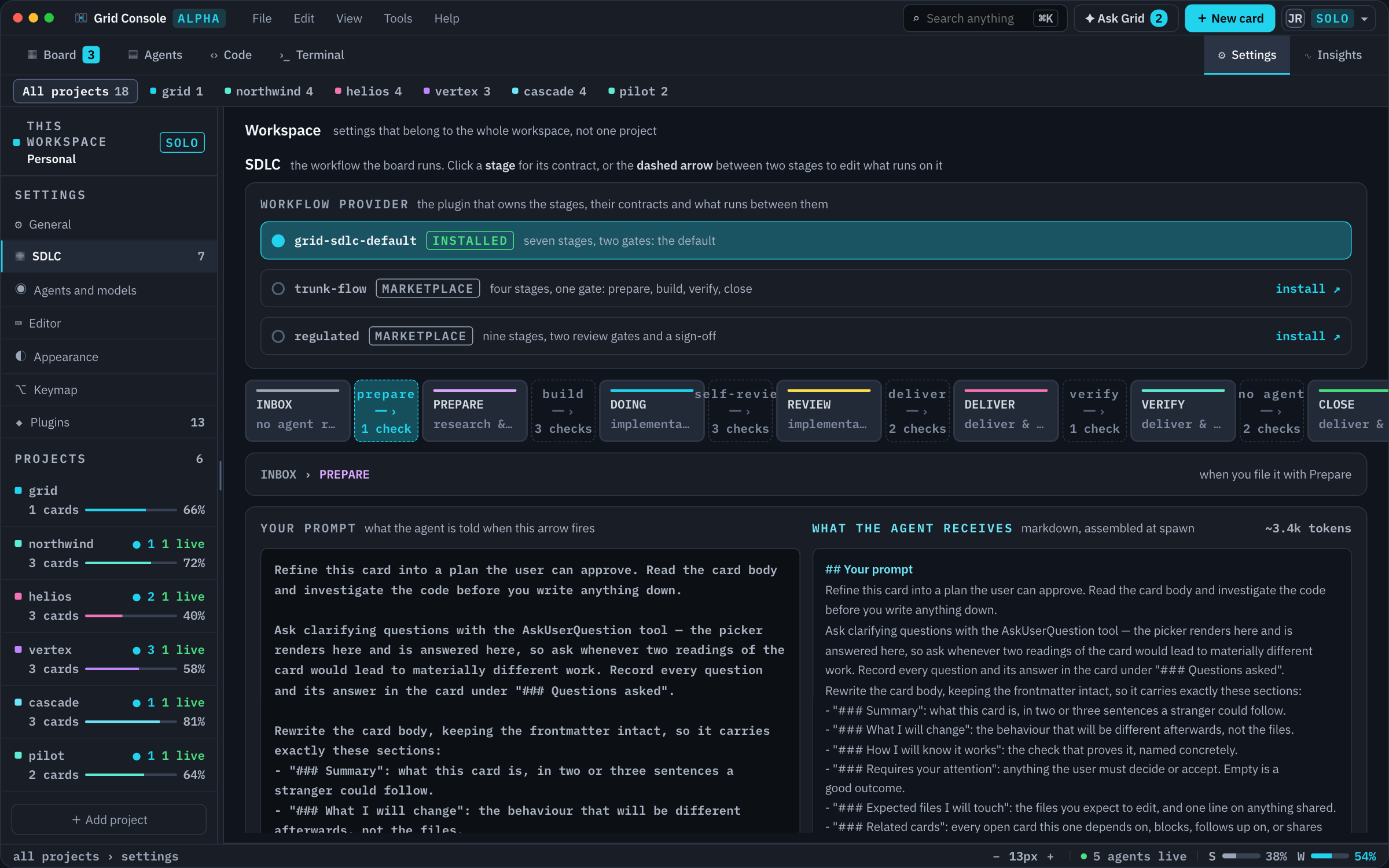
I'm interested in what other people would change here. Someone working on a very different codebase may have a better way to prepare a task, or may need a review step I've never thought about.
Have a look around
Grid itself runs locally. Your repositories, cards, sessions and project notes stay on your machine. The coding-agent CLI still communicates with its model provider under that provider's settings and policies. Grid also makes requests for things like device sign-in, licensing and updates. The security and privacy documentation lists those separately. Connecting to your own machine from another device, as I do with Tailscale, is your own remote-access setup.
There are builds for macOS, Linux and native Windows. I'm mainly developing on macOS, so that's where I have the most day-to-day experience. I haven't fully tested the Windows version yet. If you try it there, I'd especially like to hear what breaks. It's an alpha, and there are rough edges. In particular, I've been spending time on provider-specific waiting states and approval handling.
Solo is free during the alpha, and model access is separate. The current access steps are on the download page, with setup instructions in Getting started. There's a demo project you can explore before pointing Grid at one of your own repositories.
I know this workflow works for me. What I want to find out now is where it falls apart for other people. If you're one of those people with 8 tmux windows, 5 worktrees and a bunch of scripts holding everything together, you're probably exactly who I want to hear from :)
What takes the most effort in your setup once several agents are working? Keeping track of their questions? Reviewing what they changed? Getting the branches back together? I'd like to hear how you're handling that, and which parts of Grid would make it easier or just add more work.
If that sounds like you and you're interested in trying Grid, send me a DM. You're exactly the kind of person I'm looking for. I'd love to hear what you're working on and help you get started.
Comments