updated 4 October 2026
30 pages · 6 sections
questions: Discord ↗
The code view
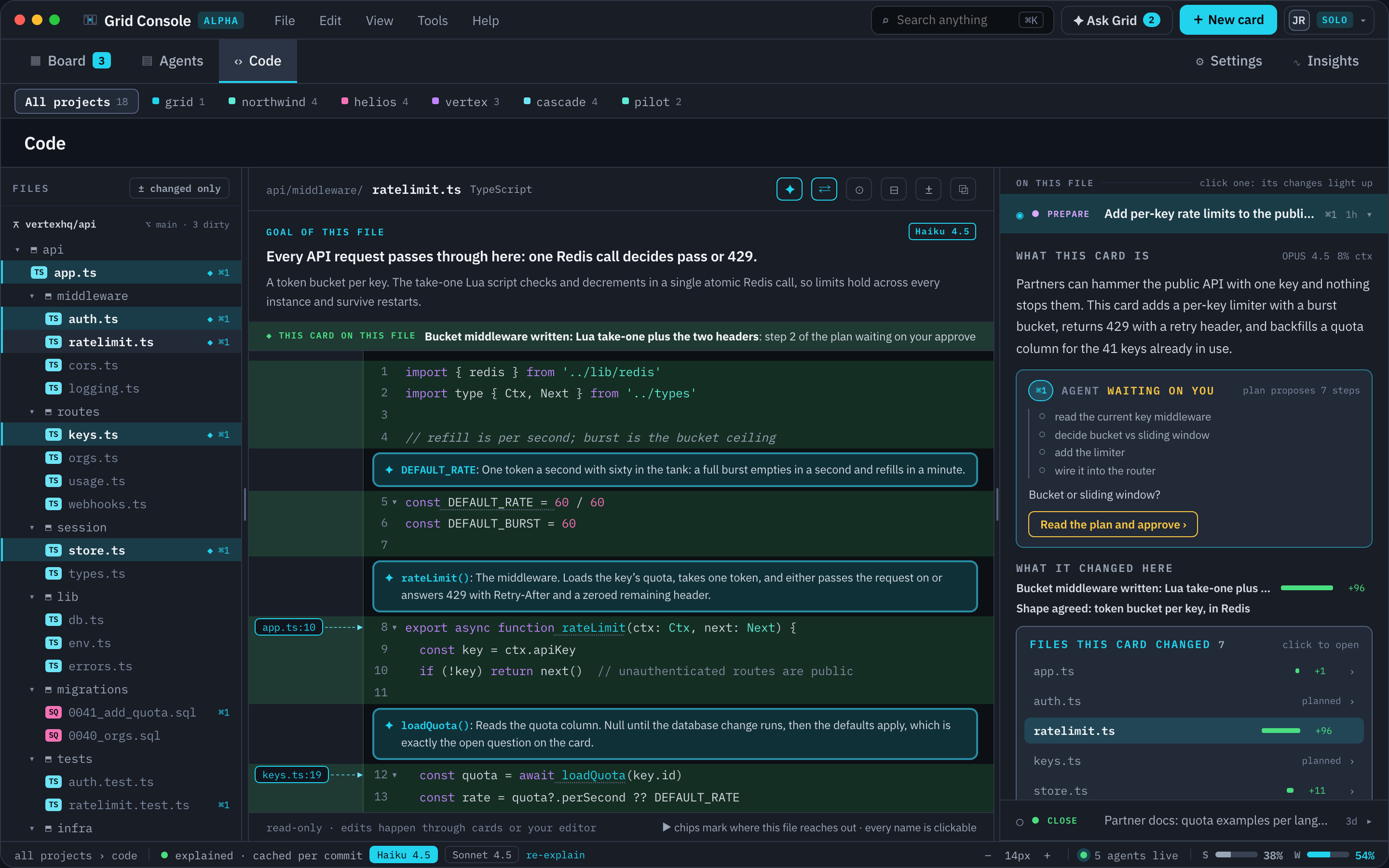
The repository with AI in the margin, read-only. Built for the specific problem of agents writing a lot of code quickly: what a file is for, what changed, and which card did it, without leaving Grid Console.
The tree
Every repository in the project, real folders, collapsible, with the key of each card that touched a file beside it. The changed-only filter narrows the tree to the files the selected card changed. Content search is a bounded git grep over the tree.
The file
The centre pane is a Monaco viewer, not an editor. Its grammars colour the text, and the footer says the rest: read-only, edits happen through cards or your editor. The code starts at line one.
Callers are code lenses on the symbol's own line, with a jump to the call site. Where a symbol has many callers the lens collapses them into a count you can open. The files that import this one have no line to sit beside, so they are one chip in the editor header instead: N files import this. The outline and the symbol list come from tree-sitter, which runs in the engine's language worker for ten languages: TypeScript, TSX, JavaScript, Python, Go, PHP, Rust, Ruby, Bash and YAML. Markdown and Dockerfile use plain rules. Callers are found by a git grep over those symbols.
No language server is started. Go to definition and Find usages in the context menu say so, and the LANGUAGE INTELLIGENCE panel under Settings > Editor prints the same table per language; the menu follows it the day a server is added.
The diff
A card's review diff opens in the same pane, as a Monaco diff editor: the file as it was on the left, as the card left it on the right. It reveals the first change as it opens rather than starting at line one, so a change hundreds of lines down is not something to go looking for.
Blame, and history with the why
Blame is real: a route runs git blame and folds consecutive lines of one commit into ranges. Card history is per card rather than per commit: pick a card in the right pane and WHAT IT CHANGED HERE lists its edits to the open file from the edit journal, with the files it changed elsewhere in a box beneath.
The right pane
ON THIS FILE lists the cards that touched the open file; click one and its changes light up in the text. The open card shows its stage and, if an agent holds it, a live block: state, step count, a four-row task window, why it is waiting or working, and one action that opens the session. Conversation happens in the session; the pane has no composer.
The list is capped at six, with a + N more on this file row for the rest and the card you have selected kept visible past the cap. When no card has touched the open file, the pane lists the project's five most recent instead.
Getting here, and back to your editor
Every file or diff list in the product carries a Code view action, and the Edit menu's Find bar searches the page. On a large screen the code view is one of the wall panes.
A file path written anywhere in the app opens here too. One scanner reads the paths an agent writes and draws each as a chip that opens the code view, at the line when the text names one. It covers the card body and its summary, the task list, the findings, the verification log, the session's conversation, the execution plan, backlog sections, documents opened from a card, and the phone card.
Open in editor runs code -g <file>:<line> when the VS Code CLI is on your PATH and otherwise hands the file to the operating system.
Arrives with the public beta. A configurable editor command, and explanation that follows your selection.