updated 4 October 2026
30 pages · 6 sections
questions: Discord ↗
Cards, capture and the stages
A card is one piece of work: a markdown file with a title, a body and a stage. You describe it in your own words, Grid works out the rest, and an agent walks it across the board until it is closed. This chapter covers how a card comes in, what its type and difficulty mean, and what happens at each stage.
Capture
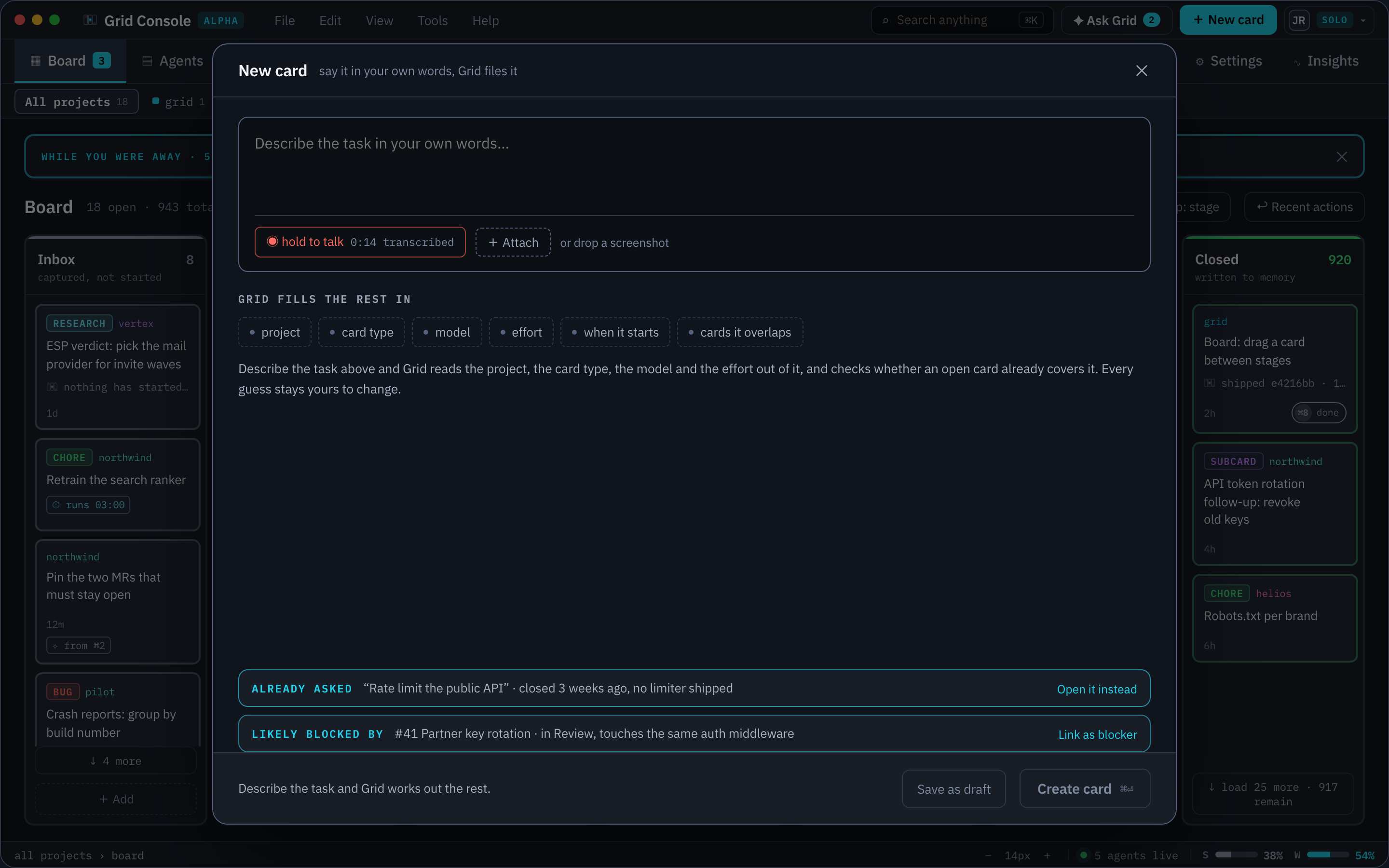
Press + New card in the top bar, or ⌘N anywhere, and describe the task; + New idea in the backlog's header sends it to the backlog instead. Grid reads the project, the card type, the difficulty, when it should start and which open cards it overlaps out of the text, and marks each guess as suggested until you pick, after which it reads as yours. A screenshot can be attached or dropped onto the sheet.
The sheet asks for what Grid cannot infer and nothing else. Model and effort follow from the card's difficulty. The sheet shows it as a ladder of Easy, Normal, Hard and Very hard, with a plain sentence under each rung saying what it will do. A fifth Custom tile sits beside them and is not a rung but a state: it lights when the card carries a pin of its own, and it is never clickable. See Difficulty and models.
Under the ladder, WHAT THIS CARD WILL DO draws the five stages an agent ever spawns into (Prepare, Doing, Review, Deliver, Verify) as editable columns, each with a MODEL and an EFFORT you can pin by hand. A pin is written on the card as stage_models and read on every spawn, laid over the same table the columns already show, so a cell nobody has touched resolves exactly as it did before. Picking a rung again clears every pin.
When it starts is a choice between now, where an agent picks the card up as soon as it is filed, and later, where it waits in Inbox.
OVERRIDES changes, for this card only, what its project would otherwise do: ACCOUNT, the account that pays (shown once there are two); DELIVERY, how the work lands (pull request, draft PR, push the branch, merge without pushing, or merge then push); WORKSPACE, where it runs (its own worktree, a branch on the main tree, or the main tree with no branch); and GATES, Skip plan approval and Skip human review. reset to project defaults puts every row back.
Before the card is filed Grid checks the board. A closed card that already asked the same thing is offered instead, and an open card that touches the same files is offered as a blocker.
Other ways in
| Source | How |
|---|---|
| The phone | The same capture, typed, with the guesses shown as chips. |
| The terminal | grid card new with flags for everything the sheet guesses. |
| The Code view | New card from a file, with the file already named in the body. |
| The backlog | A refined idea starts as a card, in Prepare or straight into Doing. See backlog. |
| A design | Create cards turns what changed in a design into backlog ideas or a research card. See design. |
| A masterplan | A masterplan files its own subcards. See masterplans and subcards below. |
| A follow-up | A closed card can spawn a follow-up that carries its context and, if the original is still open, branches from its branch. |
| A fork | A card whose session has a conversation can be forked. The new card lands in the same project at the same stage, carries forked_from and fork_parent_session, and its session starts as a fork of the parent's conversation. It is independent from then on. |
From the terminal:
grid card new "Title" --project <name> --stage inbox|prepare \
  --type <type> --difficulty <rung> --blocked-by <ref>,<ref> \
  --parent <ref> --new-project
A title is capped at sixty characters. The daemon has to be running for the card to be written.
The file
Every card is a markdown file you can open in any editor:
~/.grid/<workspace>/cards/<project>/<stamp>_<slug>.md
The front matter carries the state the engine reads: status, type, difficulty, project, parent_card, blocked_by, base_ref, author, stage_models for the card's own per-stage model and effort pins, target for the account it spawns on, the cadence and trigger set (cadence, cadence_at, cadence_cron, trigger, trigger_stage, trigger_notif, on_overlap, and run_of, run_count and last_run_at for a run and the card that filed it), and contract: off for a card that opts out of the section checks. The body is written by you and then by the agents, stage by stage. Attachments sit beside the file. Grid watches the folder, so a change made by hand or by an agent shows on the board within a second.
Card types
The type decides how a card moves: which stages it walks, what its first prompt says, and how freely its agent may act. It does not decide the model; that is the difficulty's job.
| Type | Behaviour |
|---|---|
| Auto | Undecided. It walks the ordinary stages, and Prepare's first job is to work out which type the card really is and write that on it. |
| Feature | New behaviour, so it walks every stage: a plan you approve, the build, a diff you read before anything ships. This is what a card with no type written on it is. |
| Research | Answers a question instead of changing code. It skips Prepare and Verify and keeps Review, because its whole output is a document you are meant to read. Approving the review closes it. |
| Bug | Walks every stage, told to reproduce before fixing: the failing test is the contract, written first, and the review names the test that proves the fix. |
| Chore | Routine work you do not want to read through. Its plan is pre-approved, it never asks, and Verify is the gate instead of you. |
| Masterplan | Splits a job into subcards, runs them and tracks them. |
| Subcard | A unit of work owned by a masterplan. It has no session of its own. |
| Agent | Work that runs on its own: a nightly drill, a weekly sweep, a follow-up when a pipeline goes red or a card closes. It carries a cadence, an event trigger or both, files a fresh run each time it fires, and walks only Inbox, Doing, Verify and Closed. You approve the first run; later runs compare with the last one and report what changed. |
| Guided | Work you do with Grid helping. Prepare writes a goal and a step-by-step checklist, each step marked for you or for Grid; in Doing, Grid does its own steps and stops at each of yours. It walks every stage. |
The nine are seeds. Every field on them is editable in Settings under Card types, and a workspace can add types of its own. A custom type picks a name, the stages it walks, whether it asks, and one of three roles the engine implements: plain, master or sub. A type cannot skip Inbox, Doing or Closed.
The capture sheet offers five of the nine as tiles: Auto, Research, Masterplan, Agent and Guided. Bug and Chore are what Auto resolves to once Prepare has read the task, so neither is offered as a tile of its own, and Subcard needs a parent to run it.
Cards that fire on their own
A card carrying a cadence or a trigger is a definition. It stays in Inbox and files a run card each time it fires, titled after it and pointing back at it with run_of. A cadence is day, weekday, week, month or cron, with an hour. A trigger is an event: created, stage, notif or closed. Both answer on_overlap for what happens when the card fires while a previous run is still open: skip, the default, queue or parallel. The definition itself never walks the pipeline: a move out of Inbox is refused, with clearing its cadence or trigger named as the fix.
A card written with type: recurring or type: guard is read as an Agent card. Its file is left as it is, and its runs go straight to Doing, since Agent skips Prepare and Review.
Guided cards
A guided card's Prepare writes a ## Goal and a ## Steps list of markdown checkboxes, each tagged (you) or (grid). The card panel shows the goal, which step is yours next (YOUR TURN · STEP 2 OF 5), the steps with a box to tick for each, and what done looks like. Ticking a box writes that one checkbox back into the card and nothing else, and you can tick one by hand in the file just as well.
Masterplans and subcards
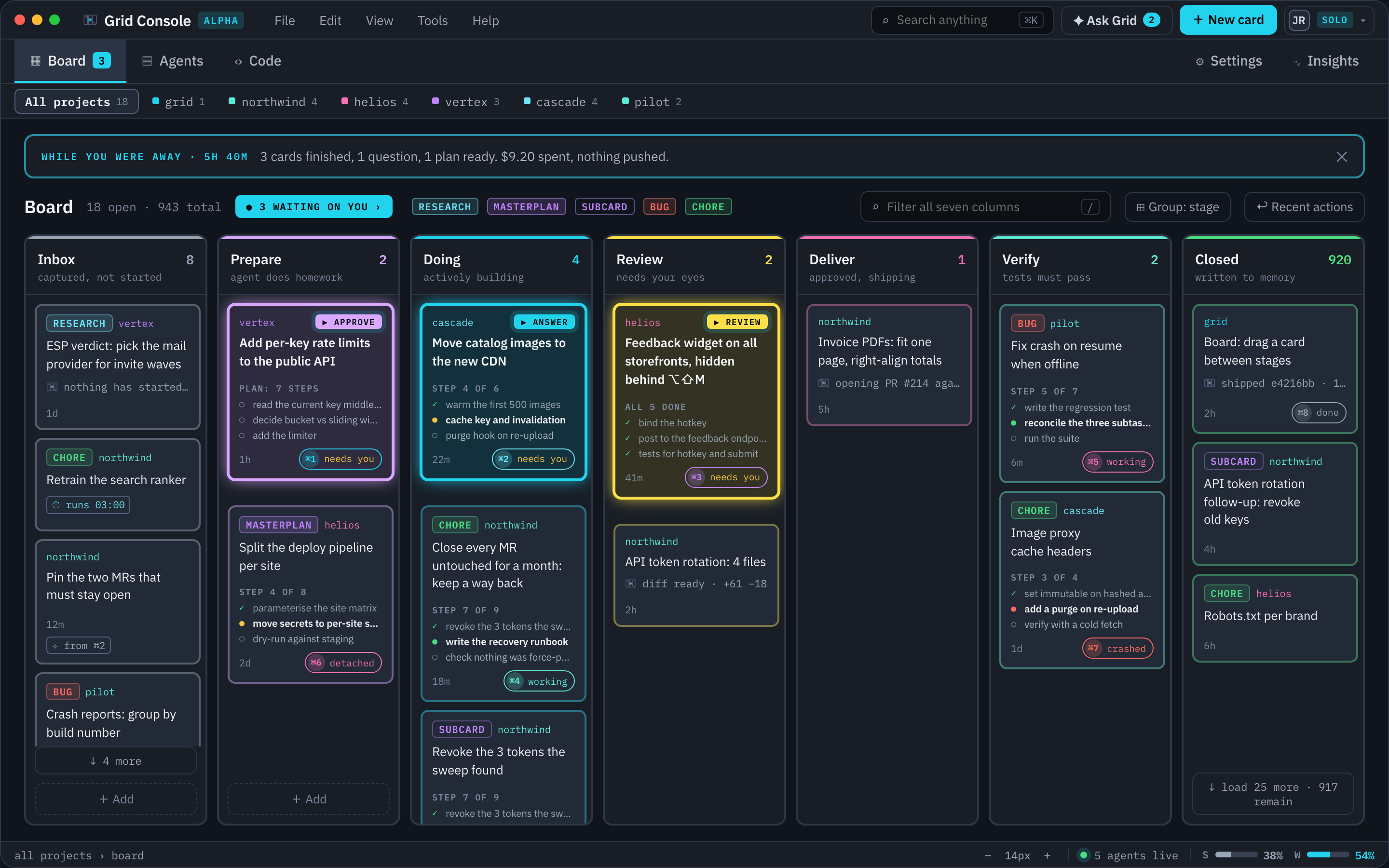
A masterplan is a card that splits a job into subcards, runs them itself and tracks them on the board. It is the shape for anything too big for one session to hold in its head: a migration that touches every service, a feature that lands in three repositories, any job whose plan would otherwise be a list of other cards. It is the only card type that owns other cards. Pick it from the Masterplan tile at capture, file it with --type master, or let the backlog's refinement split an idea into one. Its difficulty is an ordinary rung and decides the model the masterplan itself plans and integrates on.
| Stage | What the masterplan does |
|---|---|
| Prepare | The plan is the set of subcards. The masterplan's agent files the ones that are missing, writes each body as the brief its worker will read, sets a difficulty on each and records which subcards wait on which. You approve that set. |
| Doing | It runs each subcard as a subagent on the model and effort the subcard's difficulty resolves to, in the masterplan's own worktree. Grid works the waits out into waves and hands the masterplan the order; it starts every card in a wave in one turn, and a subcard runs only after the cards it waits for are closed. The masterplan is told to run two subcards of a wave one after the other only when they edit the same files or share a port or a database. Each subcard is one builder that runs only the tests of the files it changed. The full check, a reconciliation pass over the subcards against each other, and the adversarial review run once, after the last subcard closes. |
| Review | One review for the whole job. The masterplan has written what changed into each subcard and the summary into its own body. |
| Verify and Closed | The masterplan's branch is the one that lands. Its subcards close with it. |
A masterplan cannot move to Review, Deliver or Verify while any of its subcards is still open; the board refuses the move and names the subcards still running. Closing goes the other way: closing a masterplan, by hand or by its own agent, closes every subcard of its own that is still open, and each gains a section saying it closed with its masterplan and which stage it was in, so a subcard reading Closed never quietly claims its own work was finished. Moving a masterplan back to Inbox takes its open subcards back with it, each with a section saying so. A move that did not land moves nothing.
Subcards never sit behind their masterplan: when the masterplan is in Prepare every subcard still in Inbox moves to Prepare with it, and when it is in Doing every subcard in Inbox or Prepare moves to Doing. A subcard already further on, or closed, is left where it is.
A subcard is a real card with its own stage, so you can watch the job come apart and go back together. It has no session of its own: the masterplan does the work, writes what changed into the subcard's body, ticks its tasks and closes it, and a question raised while a subcard is worked is raised on the masterplan's card. The masterplan files subcards from the terminal, and you can file one by hand the same way:
grid card new "Move secrets to per-site stores" \
  --type sub --parent <masterplan-ref> \
  --difficulty hard --blocked-by <ref>
The parent is written into the subcard's parent_card front matter. Subcards fold into a stack under their masterplan's tile, with a chip counting how many there are and how many are open, and anything a subcard needs from you rolls up to the masterplan's tile. The masterplan's agent chooses only a difficulty per subcard; Grid resolves the model and effort from the workspace table, so a change of compute budget moves every subcard with it. Deleting a masterplan in Inbox takes its subcards with it; see moving a card by hand.
Subcards run in the masterplan's worktree instead of trees of their own, and a masterplan's subagents are visible in the session's own transcript rather than as separate agents on the Agents page.
The stages
| Stage | What happens |
|---|---|
| Inbox | Captured and waiting to start. The whole card is editable in the inbox sheet. Past Inbox the session's EDIT chip opens the same sheet, where only the body goes read-only: the title, the type, the difficulty, the per-stage dial and what the card waits for stay editable at every stage. |
| Prepare | The agent does its homework. It reads the code, asks you the questions it cannot answer, and writes a plan with a task list. Approving the plan moves the card on. |
| Doing | A fresh agent builds the plan top to bottom in the card's worktree, ticking tasks as it goes and marking anything it added as a deviation. |
| Review | Needs your eyes. The agent has written what changed, what it assumed and what you should look at. You approve, send it back, or reject it. |
| Deliver | Approved and shipping. Grid itself tracks and fills in the live step list: commit, tests, land, push, pull or merge request, CI, merged, deploy, cleanup. The tests run on the card's branch before it lands, and a red Tests row holds the card here. |
| Verify | Tests must pass. A fresh agent restarts what the change touched and drives it for real. It does not run the project check itself, because Grid ran that on the branch in Deliver and the row is already on the card. It records pass or fail with the evidence it saw. |
| Closed | Written to memory. The branch lands and the card becomes part of the project's history. |
Where Deliver sits is a per-project choice: after Review, after Verify, or not at all. The default is after Review, so approving a review sends the card to Deliver, where the commit, the push, the pull or merge request and the deployment happen as tracked steps rather than only at close.
Deliver's placement is an engine setting today, changed through the API. The switch in the project's settings is on its way.
What the agent must write
Every stage prompt ends with the sections the card has to carry when it leaves that stage, so the next agent and you always find the same headings.
| Leaving | Sections |
|---|---|
| Prepare | Summary. What I will change. How I will know it works. Requires your attention. Expected files I will touch. Related cards. List of tasks. Questions asked, with your answers. |
| Doing | Summary. Changes so far. Changes still to do. Task list, every finished line ticked. Tasks added after approval, marked as deviations. Requires your attention. |
| Review | A Review block with Needs your eyes, Assumptions, What changed, Files touched and Branch. |
| Deliver | Delivery: the PR or MR URL, the pipeline verdict, the environments it reached. |
| Verify | Verification: pass or fail, plus one line of the evidence. |
The sections are the same for the whole workspace: they come from the workflow and the engine, are shown read-only on the Agents tab, and are not overridden per type or per project yet. The Review block is the one gate the shipped workflow enforces. A card whose last Review block is missing a heading cannot enter Review; the move is refused with the missing headings named, and the agent is told. Everything else is a contract the prompt states and the next reader checks.
Who works each stage
An agent keeps its session across most arrows, so it keeps its context. Three arrows always hand the card to a fresh agent: Prepare to Doing, so the planner never builds its own plan, and any arrow into Deliver or into Verify, so neither has seen the code being written. Doing to Review also hands over when the card's difficulty has adversarial review switched on, which is the default from Hard upwards; the reviewer then reads the diff cold and writes its findings before you see the card. A card found in Deliver or Verify with no session when the daemon starts is given one.
Your decisions
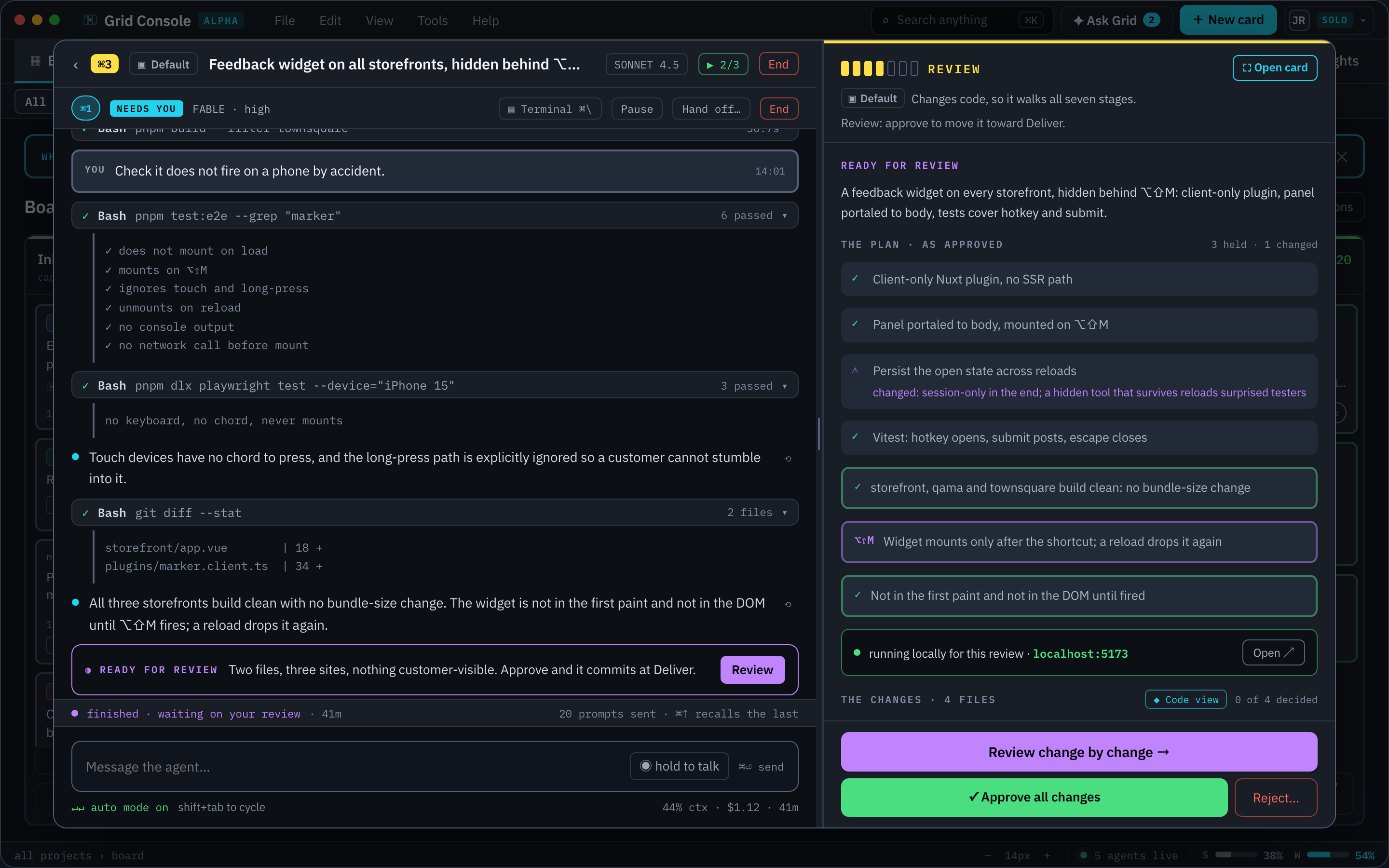
At Prepare you approve the plan or answer the agent's questions. Grid keeps a snapshot of the plan at approval, and the review later shows what drifted from it.
At Review you have four moves. Approve sends the card on to Deliver or Verify. Request changes sends it back to Doing with your note. Back to inbox drops the work and keeps the card. Reject and close closes it and, by default, undoes the code work; switch that off in the dialog to keep the branch.
On a card with an adversarial round, every finding the reviewer wrote carries one three-way decision, made once on the panel's own list: FIX sends it back to Doing as a task row, LATER files it on a follow-up card, DROP records it as accepted and files nothing. A critical starts on FIX and everything else on DROP. While any finding is on FIX the footer's primary is the send-back and Approve is not drawn at all. The dialog's own FINDINGS TO SEND BACK list is read-only, because the picks are made on the panel.
Whether a card stops for you at the plan and at the diff is decided by its type and by the GATES at capture: a Chore's plan is pre-approved, and Skip plan approval and Skip human review waive either gate for one card. Rules per stage, per type and per project are planned; see workspace settings. A question from an agent shows on the tile and in the session with the choices the agent offered, and the answer is written into the card so the next agent reads it too.
Blocked and related
A card can be blocked by another. A blocked card waits in its stage until the blocker closes, and the board draws the link when you hover a tile. Prepare's contract asks the agent to list every related open card: what this one blocks, what blocks it, what it follows up and which cards share its files.
Moving a card by hand
Drag a tile between columns, use the stage menu on the card, or run grid card move <ref> <stage>. Every move goes through the same gates as an agent's, so a card cannot be dragged into a stage its type does not walk or past a check that would refuse an agent. Every move, by hand or by agent, is logged on the card with who moved it and why.
A card can also move to another project. The card sheet's PROJECT panel draws a chip per project, and picking one renames the card's file and re-slugs it there and then. It is offered in Inbox only: past that the card has a session, a worktree and a branch under its old slug, and moving it would strand all three.
Deleting is Inbox only too. Delete card arms on the first press and deletes on the second, and those two presses are the whole consent: the file is unlinked, there is no trash and no restore, and a card whose agent is still live has the session ended first. For a masterplan, the armed button names how many directly owned subcards will go too; the second press deletes those subcards and then the masterplan, while dependency-linked and unrelated cards stay put.